How to Repair Corrupt SQL Database & Recover Data from MDF Files

Have you ever met similar experience with your SQL Server: you are unable to access a MDF file that contains many useful records. And it just pops out some wired error messages. After running either the dbcc checkdb command or the dbcc checktable command, it is confirmed that SQL database corruption has occurred with your current using SQL Server 2000/2005/2008 etc. The situation can happen if your SQL has just suffered server errors, database damage, hardware problems, virus attack etc. See possible causes and repair solutions below.

Typical Symptoms
  • Extent E_ID in database ID DB_ID is allocated in both GAM GAM_P_ID and SGAM SGAM_P_ID.
  • Table error: Object ID O_ID, index ID I_ID, page P_ID, row ROW_ID. Record check (CHECK_TEXT) failed. Values are VALUE1 and VALUE2
  • Database corruption occurs after you run the "alter table" Transact-SQL command to change a column from not null to null in Microsoft SQL Server 2000 
  • A database is marked as suspect and the database becomes unavailable. 
  • Database error: PAGE_TYPE page P_ID for database 'NAME' (database ID DB_ID) is invalid. 
  • And more strange error hints.

Possible Causes
  • Corruption in the extents due to the irregularities in the IAM, GAM, and SGAM pages. 
  • A condition specified in the CHECK_TEXT statement could not be fulfilled. 
  • The database table is logically or physically damaged. 
  • SQL Server does not synchronize column status between the syscolumns system table and the sysindexes system table. A column is part of a clustered index key that may be null.
  • Either the file header page or the boot page is damaged in the mentioned database.
  • And more reasons out there.

Resolutions
  1. To solve the problems, first of all check if you have backup. If updated SQL database backup is available, then the issue can be resolved easily, try to restore the data from your previously taken valid backup.
  2. If you don't have a backup, make sure that the database is online. Then run the dbcc dbreindex command or the dbcc checktable command by using the repair_rebuild option. If the database is marked as suspect, telephone Microsoft Customer Support Services as Microsoft has confirmed that this is a problem in the its products.
  3. If that still won't help, then the last option is by relying on a SQL recovery tool to repair SQL database and recover the data back.

Speed up Your Slow Laptop with These Free Software & Tips


With the passage of time, is your laptop running much slower than it used to? Symptoms such as taking longer to start up , sluggish while running applications, browser (IE, Firefox, Google Chrome, Opera, etc) very slow to load web pages, or the laptop just freezes for no reasons?

Actually I did experience some of the situations with my HP Pavilion G4 laptop during the past year. Is there any feasible ways to speed up slow laptop computers? Today, I'd like to share with you some of my personal thoughts.

Also read: how to fix a slow HP Mini netbook.

Possible Causes


  • Outdated hardware configuration. If you are using some low-level or second-hand laptop, there are assortments of things that can happen to your hardware such as CPU, RAM etc that may deep disturb laptop performance.
  • Overload startup programs. Generally as you add additional programs on your laptop, they can slow down your start-up status quietly. The more programs you have that are loading at start-up, the slower the start-up. 
  • Corrupted registry issues. The Windows registry is the master control center for your operating system and the applications it runs. Corrupted registry could cause a lot of errors and issues, especially when you are running certain applications. 
  • Remnants of uninstalled applications. It's easy to install a new program on laptop, but usually not the case when you attempt to 'completely' get rid of them. 
  • Too many junk junks. Each time you create or save new files, surf the net or chat with friends etc, your laptop hard drive could be crammed with many useless files left behind quickly. These can take up a large amount of precious disk space.
  • Poor security software. A lot of security programs or suites are bloated with software and demand a great deal of system resource and memory.

Tips to speed it up

  1. Upgrade your hardware (RAM, hard drive) if possible, this is the by far the most effective way to get rid of laptop running slow problems.
  2. Choose a good system protection or antivirus program. The idea one should be with strong protection capability, as well as lightweighted i.e. taking less system resources.
  3. Regularly clean the junks, caches, recycle bin files & remove unwanted startup programs from 'Control Panel'. 
  4. See additional tips to speed up a Windows based laptop.
Free software you can use

CCleaner – the most popular registry clean app for Windows users to free up more valuable hard disk space for storing new data by cleaning traces of your online activities such as your Internet history. Moreover, it’s more than a laptop clean utility. There are some more fantastic features you may find quite useful too. Learn more from this article I wrote a while ago.

Galary Utilities – The No. 1 Free, Powerful and All-in-one utility for cleaning your PC, it is a comprehensive pc system care utility as well as a laptop speedup program. One-click to diagnose your slow laptop problems and help improve its performance by many ways such ejects dangerous Malware, fix system errors, clean up clutter, optimize your laptop's memory.

[update on March 28, 2016: this post intends to target laptops based on Windows opearting system. If you are using a Mac laptop, check out the 7 ways to speed up a MacBook, it's an excellent resource.]

Do you find these tips or software helpful? Do they work to help you speed up your slow laptop? Leave a comment and share your experience.

HP USB Disk Storage Format Tool - A Free Formatting Utility

Have you ever encountered the situation: your USB, memory card or external drive became partial or totally corrupted thus you are unable to format / initialize it with the internal Windows formatting tool?

Now you don't have to worry about that as there is such a third-party formatting utility - HP USB Disk Storage Format Tool, which is right designed to take PC users' stress.

Note: do not format the device if you're unsure what you are doing. Most memory card errors can be fixed without formatting the device. See this article for steps on how to resolve it first.

It is a Windows-based utility freeware which has been designed for the HP Drive Key or DiskOnKey USB 2.0 devices. Installing the freeware does not represent a problem whatsoever, since it is very compact (only 96 kB). It runs smoothly and we have not encountered any issues.

The only difference between the HP USB Disk Storage Format Tool and the regular format tool found in Windows is the fact that this freeware allows you to select USB drives, while the Windows version is does not have this option. By the way, it works to format problematic memory card as well.

Moreover, the Windows format tool does not offer a NTFS volume label for format, while this tool can, and the freeware allows you to create a FAT32 volume which is bigger than 32 GB. Another awesome feature about this format tool is that you can rename all your USB flash drives in any way you want. The program supports all FAT, FAT32, or NTFS partition types.

Free download HP USB Disk Storage Format Tool from CENT here or Filehippo here.

See how to use this free formatting tool from this YouTube video:

Merry Christmas!


I can feel the steps of Santa Claus now.

Merry Christmas to all my family.

Merry Christmas to all my dear friends in the distance.

Merry Christmas to all my blog readers.

Hope you all enjoy the huge festival season!

Sincerely! 


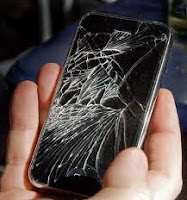
How to Recover Data from Broken or Water Damaged iPhone

Oh, no. So, your iphone is just broken or water damaged, and you have tons of precious data in it? No one likes the suffering, indeed. Just a couple of days ago one of my buddies fell his iPhone 5 onto the ground by accident. But good news is the phone is okay except a few edges are cut.

However, not all iPhone users are as luckly as him. There are situations when iPhone glass is totally broke and wouldn’t turn on, or the device slept too long in the water and got severely damaged and dead now.

The question is: is it still possible to retrieve files from an iPhone that is totally broken or water damaged?

Well, it is. But chances of recovery depends.

The first thing you maybe have in mind is – send your device to a fix center or for recovery service. Yes, I also hear that there are professional data recovery experts out there offering such kind of recovery service. But I have to warn you though, it's not cheap and the chance is not 100% guaranteed.

So what is the best way to try first?

Yes, you may have guessed it -- by using software! That's why this data security freeware blog is opened for! Please note: I am here talking about recovering lost files from an iPhone, other than teaching you how to repair a broken or damaged phone. To do that, you may want to check out this iPhone article, watch the video inside.

If you have iTunes or iCloud backup, things can be much easier. Simply go to this Apple guide for how to restore your iPhone data by extracting the backup files.

If that method doesn't work either because you don't have a backup or iTunes/iCloud fails to help, the next solutions is by using an iOS data recovery software. No matter you've suffered iPhone broken, damaged, or you just mistakenly deleted something items (photos, videos, Contacts, Call recorder etc) off the device, the data insides may be still recoverable provided that they are not fully written over.

How to do that? Well, it's actually quite simple. You don't need to connect your iPhone or launch iTunes. Just install the program on the computer (runs Windows or Mac OS X) and start to scan from iTunes or iCloud backup. That's it. Soon, you'll see a list of items being displayed on the software panel.

This post was last updated on: June 12, 2016.